Blog · News · 3 min read
Your iPhone can now run your home when the relay is offline
When your relay can't reach Apple Home, the Homecast app on your iPhone, iPad or Mac now steps in and talks to it directly — automatically.
By Rob Parker
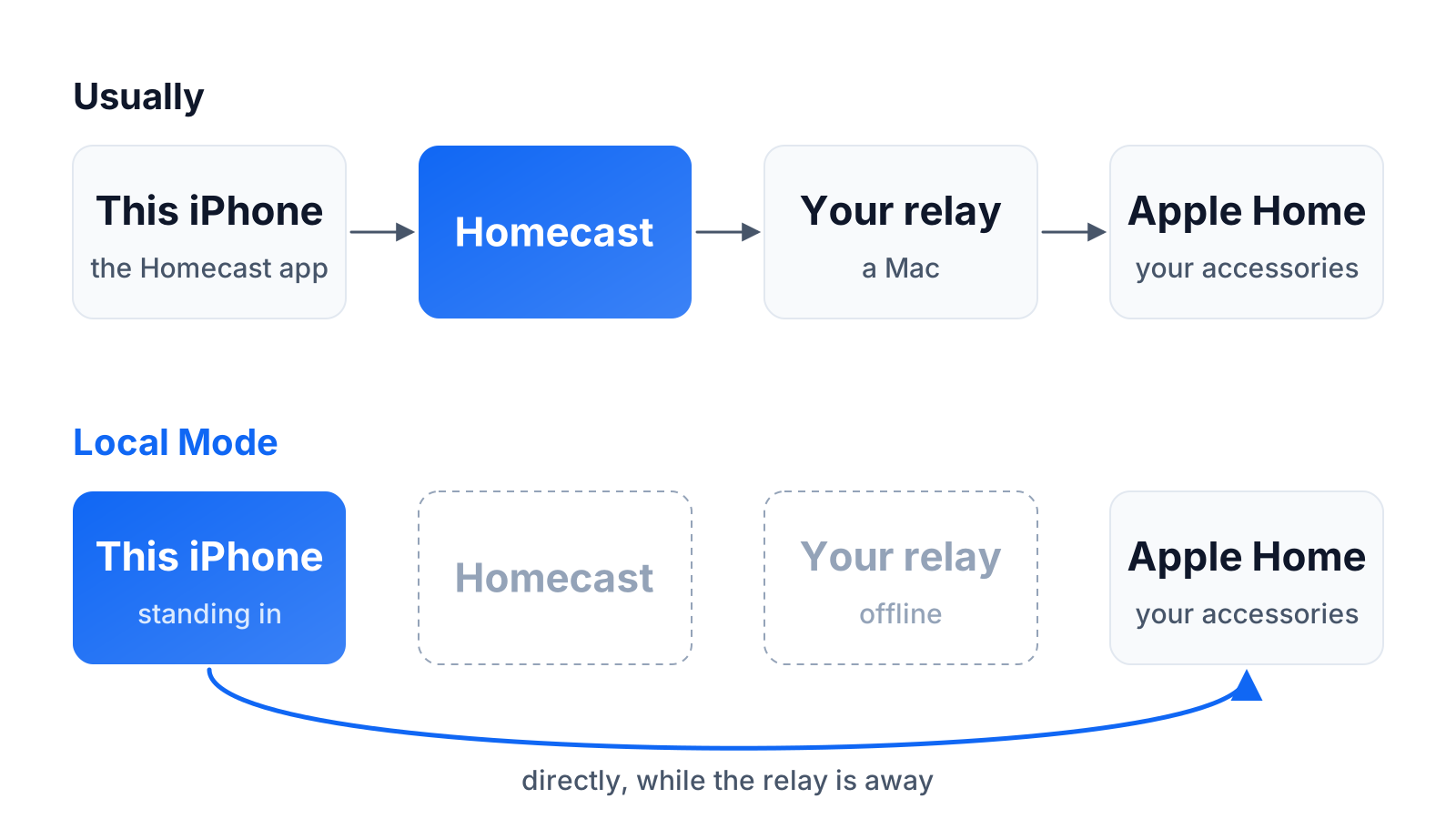
Everything in Homecast goes through a relay — the Mac that's signed in to your Apple Home, either your own or one we run on the Cloud plan. That's what lets an Android phone, a browser or an AI assistant control your house: the relay does the talking to Apple Home on their behalf.
It also meant that when the relay went away — your Mac restarted for an update, the power blipped, the Wi-Fi had a moment — Homecast went away with it. Even on an iPhone that was itself perfectly capable of talking to Apple Home.
Since the middle of September, it doesn't. If you use the Homecast app on an iPhone, iPad or Mac, and that device has access to your home in Apple Home, it now steps in when the relay can't. We call it Local Mode.
What you'll notice
Mostly, nothing — which is the point. If the relay stops answering for about eight seconds, the app quietly takes over, so you don't get an offline screen before it's had a chance. When the relay comes back, it hands control back about twenty seconds later.
The one visible sign is the status badge at the top of the dashboard. While your device is covering, it reads Standing in, with an amber dot. Tap it and it tells you exactly what's happening — something like "Your relay isn't answering, so this iPhone is talking to your home directly — while Homecast is open."
While it's standing in, your lights, sensors, locks, blinds, scenes and rooms all work as normal, with the names and layout you've set up in Homecast.
What stays with the relay
Local Mode is a stand-in for you, on your device. Some things only the relay can do, and they wait for it:
- Homecast automations don't run from your phone. If they did, they'd run twice when the relay came back. Automations you've made in Apple Home keep running on your home hub as always.
- Notifications, history recording and share links stay with the relay.
- Cameras need the relay too.
- Everyone else in the house still needs the relay. Local Mode serves the device it's running on — it can't stand in for an Android phone or a browser.
On iPhone and iPad it works while the app is open; iOS doesn't let it keep running in the background.
Who gets it
Local Mode is part of the Homecast app for iPhone, iPad and Mac, for Homecast Cloud accounts. It's automatic and there's nothing to set up. The device needs to be in your home in Apple Home, and Homecast needs permission to use Apple Home on it.
It doesn't apply to browsers, the Android app, or the Community Edition, where your Mac already is the server.
If you'd like more control, turn on Developer Mode in Settings → Account, and Settings → Local Mode appears. You can choose Automatic (the default), Always on or Off, and see whether this device is currently serving your home.
Why it matters
A smart home earns trust in the moments it doesn't fail. The light switch on the wall has never needed a server; the app on your phone shouldn't either, when the phone could do the job itself. Local Mode is a small step towards Homecast behaving like the light switch.
The Local Mode guide has the details.